When an AI assistant has hundreds of tools: lessons from real enterprise deployments
 Phạm Hải Anh · AI engineer··12 min read

Photo: Barn Images / Unsplash
An AI assistant only works well when it carries the right number of tools, and that number has to be measured, reviewed and adjusted for as long as the assistant is in service. That is the biggest lesson we took away from putting AI assistants into production on top of enterprise ERP and internal software.
At the start, almost every executive sets the same expectation: the assistant should be able to do everything employees do in the software. Logging timesheets, requesting leave, approving overtime, updating sales opportunities, checking receivables. Each of those tasks maps to one or a few APIs, and each API is usually wrapped as a tool the assistant calls through MCP (Model Context Protocol). A typical ERP exposes hundreds of APIs, so the assistant quickly ends up with hundreds of tools.
The question is whether the assistant still works accurately when it has to choose among hundreds of tools. The short answer is no. This article shares what we learned dealing with that problem, and how businesses should invest so the assistant delivers measurable value.
More tools, more wrong choices
Independent research and model providers' own tests point the same way: as the tool list grows, the rate at which the assistant picks the right tool drops noticeably. There are three reasons.
First, tool descriptions take up the model's working memory. Every tool comes with a name, a description and a parameter list, and all of it is sent again on every turn. Anthropic reports that five popular MCP servers with 58 tools consumed about 55,000 tokens before the user typed a single word, with one internal case reaching 134,000 tokens (Anthropic). The business pays for those tokens on every question, even the simplest one, and responses get slower.
Second, similar tools get confused. In an ERP, "cancel request", "withdraw request" and "reject request" are three different operations with nearly identical descriptions. The RAG-MCP authors show that as the number of options grows, models are more likely to pick a poorly matched tool, misunderstand what a tool does, or even call a tool that does not exist (arXiv 2505.03275).
Third, tools generated straight from APIs rarely fit how an assistant works. Anthropic advises against wrapping each API one-to-one. Instead of three tools such as "list users", "list events" and "create event", build one "schedule meeting" tool that finds a free slot and books it (Anthropic).
Measured results when the number of tools the model sees at once is reduced:
Test | All tools shown | Only relevant tools shown | Source |
|---|---|---|---|
RAG-MCP, correct tool selection | 13.62% | 43.13% | |
Anthropic, Claude Opus 4 on MCP evaluation | 49% | 74% | |
Anthropic, Claude Opus 4.5 on MCP evaluation | 79.5% | 88.1% | |
Anthropic, tokens used before work begins | about 77,000 | about 8,700 |
Newer models tolerate longer lists, but even the strongest model still gets it wrong roughly one time in five when choosing from a large tool library on its own. The common rule of thumb among engineers is to keep each turn at around 10–20 tools; beyond 40–50, many workflows stop being reliable (Tian Pan). That is a practical threshold, not a research finding.
Four approaches the industry uses
Effective solutions share one principle: the system may hold hundreds of tools, but on each turn the model only sees the few it needs. There are four main ways to apply that principle.
Approach | How it works | Strengths | Limitations |
|---|---|---|---|
Split by role | Each assistant carries only the tools of one department or role: an HR assistant, a Sales assistant | Easy to control and audit, no extra processing step | Users must pick the right assistant; cross-department work gets fragmented |
Group tools by workflow | Replace many small tools with one tool per business action, with a document-type parameter | Far fewer tools; each tool matches how users phrase requests | Must be redesigned around the business, cannot be generated from APIs |
Load tools on demand (tool search) | The model sees only a search tool; specific tools are loaded when the model finds them | Scales to hundreds of tools; Anthropic measured an 85% token reduction | Adds a lookup step and latency; results depend on description quality |
Specialist and orchestrator assistants | A main assistant delegates to sub-assistants, each with 5–10 tools for one domain | Every reasoning step stays small; suits cross-domain work | Complex architecture, many more model calls, harder to trace errors |
Major platforms have already productised the third approach. The Claude API lets developers mark tools as "load on demand" (defer_loading), which can apply to an entire MCP server while keeping a few frequently used tools always available (Claude documentation). Anthropic recommends turning it on only when tool descriptions exceed about 10,000 tokens or when the assistant is already picking the wrong tools.
Search has limits of its own. The RAG-MCP team notes that retrieval accuracy declines as the tool library grows into the thousands. In practice, teams therefore combine several approaches rather than choosing one.
Lessons from a real deployment
We built an assistant for a company running Odoo, letting employees log timesheets, register overtime, request leave, explain attendance exceptions and update the CRM directly from a chat window. The five lessons below come from taking that assistant into production.
1. Narrow the scope before optimising the technology. The initial wish list covered HR, CRM, electronic office and operations support, about 60 tools. After reviewing it with the client, both sides agreed to start with HR and CRM only, the two areas employees use every day. The tool count fell to 41. That scoping decision did more than any later optimisation.
2. One generic read tool instead of dozens of specific ones. Rather than separate tools for "view timesheet", "view leave request" and "view sales opportunity", the assistant uses a single tool that reads Odoo data by record type. All lookups need only 3 tools. Access is still checked by Odoo against the user's own account, so the generic read tool does not widen the assistant's permissions.
3. Every write goes through confirmation, and the assistant must collect all required information first. The assistant prepares the action; it only runs once the user clicks Confirm. Early on, when a manager asked to reject a leave request, the assistant immediately prepared the rejection without a reason, even though Odoo requires one. We changed it to ask first: "You want to reject A's leave request for 20 November, correct? What is the reason?". The confirmation card appears only when everything is in place and a single question remains: go ahead or not.
4. Many bugs only appear on the live system. Some Odoo operations saved the data but still returned a technical error. Trusting that message, the assistant would report failure and the user would try again, creating duplicate records. An automated test suite of more than 150 cases passed in full, yet none of them caught this. Today, when a response is lost midway, the assistant reports the outcome as "unknown" and asks the user to check in Odoo rather than retrying automatically.
5. Split MCP servers only for operational reasons. Many people assume that splitting a 100-tool server into five smaller ones will help the assistant choose better. It does not: the model sees every tool attached to the assistant, whichever server it comes from. Split servers when parts connect to different source systems, use different authentication, are built by different teams or carry different levels of risk. Accuracy is handled by attaching the right tool set to each assistant.
For a system with hundreds of APIs, we recommend the hybrid model shown below.
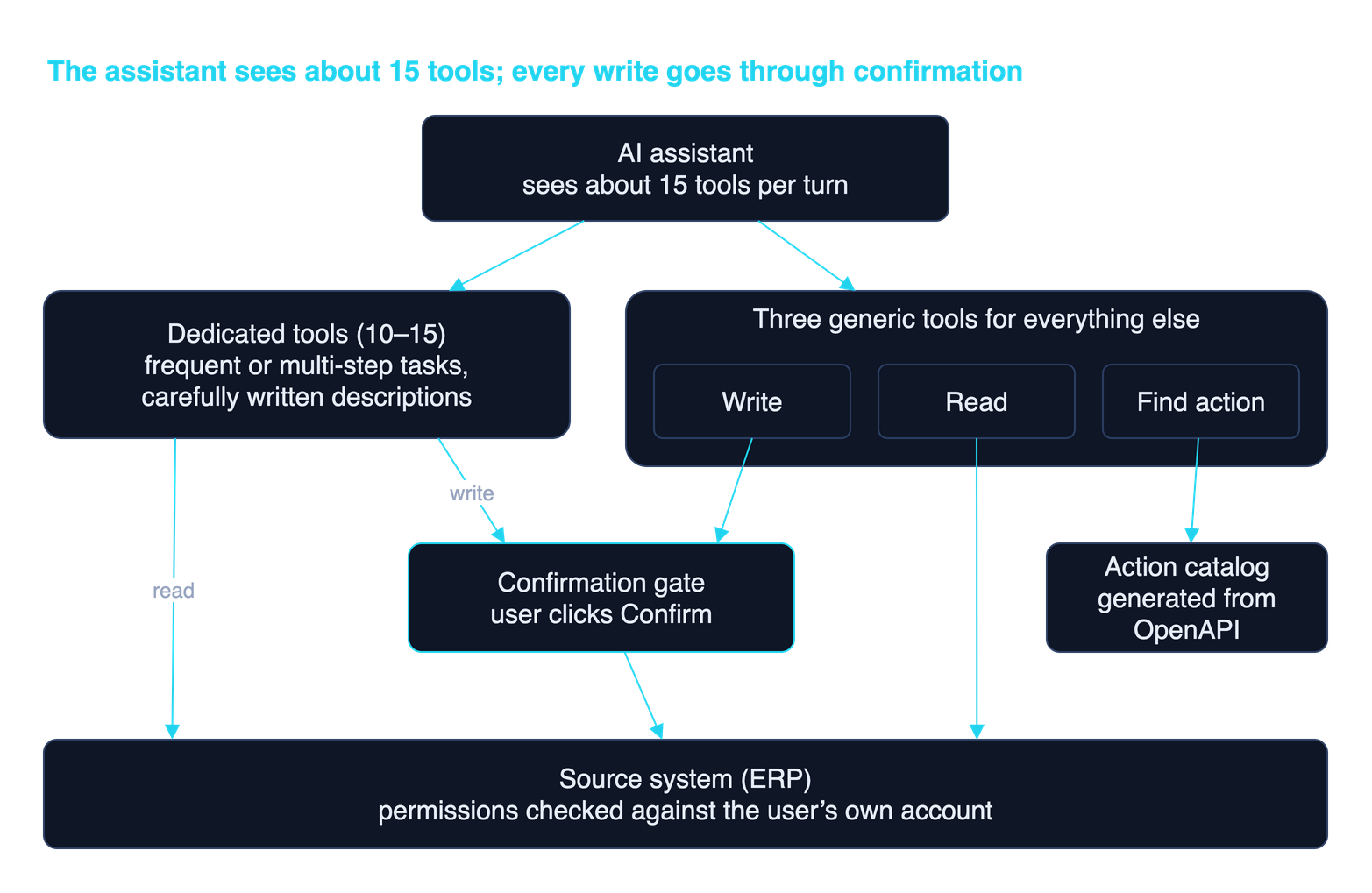
Dedicated tools serve the most frequent tasks. Three generic tools cover the hundreds of remaining operations through a catalog. Every write waits for the user's confirmation, and the source system still decides access, so the assistant never holds more rights than the person it is talking to.
Problems that do not go away on their own
The hybrid model solves the cost and confusion of showing the assistant hundreds of tools, but it shifts part of the difficulty to other stages. Businesses should know these five points in advance.
- Wrong lookups instead of wrong choices. The lookup step can return the wrong operation or miss the right one, especially among APIs with similar names. Lookup quality depends almost entirely on the description of each operation in the catalog.
- Parameters of the right type but the wrong meaning. API documentation usually records data types, not business meaning: what request type 2 is, which time zone a date uses. Automated validation catches type errors, not meaning errors. Anthropic reports that adding usage examples to tool descriptions raised accuracy on complex parameters from 72% to 90% (Anthropic).
- Multi-step operations. A request such as "move all of A's work to B" requires a chain of reads and writes. Each step needs its own lookup and confirmation, so the process is slow and easily interrupted. Operations like this deserve a dedicated tool that handles them end to end.
- Context still grows in long sessions. Descriptions and data returned by each lookup stay in the conversation, so long sessions get heavier over time.
- Errors are hard to spot. When no suitable operation is found, the assistant may use a near match and answer with full confidence. Users do not notice, and the operations team will not know either without logs and an evaluation suite.
The common control for all five is continuous measurement. Anthropic recommends building an evaluation set from real usage, each task with a verifiable outcome, and re-running it every time a tool changes (Anthropic). In operation, record which operation the assistant chose for which request, review failures regularly, and turn frequently used or frequently misused operations into dedicated tools.
Invest at the right level: an AI assistant is an operated product, not a one-off delivery
An AI assistant stays accurate only through continuous measurement and adjustment, because the source system, internal processes and the model all change over time. A "build, hand over, pay once" contract does not suit this kind of product.
Market research shows what happens when the investment model is wrong. Gartner predicts that more than 40% of agentic AI projects will be cancelled by the end of 2027 because of escalating costs, unclear business value or inadequate risk controls (Gartner). MIT's "The GenAI Divide" report found that 95% of enterprise generative AI pilots had no measurable impact on business results. The main cause was not model quality but tools that do not learn from or adapt to the company's workflows (Fortune, via Yahoo Finance). According to the same report, solutions bought from specialised vendors and deployed as a partnership succeeded in about 67% of cases, roughly three times the rate of internal builds.
An AI assistant budget should therefore be planned on total cost of ownership (TCO) across its lifecycle, covering these items:
Item | Scope | Nature |
|---|---|---|
Initial build | Business analysis, tool design, source-system integration, testing on real data | Once per phase |
Model cost | Tokens for every question, growing with the number of users and tools attached | Monthly, usage-based |
Evaluation and improvement | Maintaining the evaluation suite, reviewing logs, refining tool descriptions, promoting frequent operations to dedicated tools | Ongoing, monthly cycle |
Keeping up with change | Source-system upgrades or API changes; new models from providers; internal process changes | Event-driven, hard to forecast |
Adoption | Training staff, helping team leads drive usage, collecting feedback | Concentrated early, then sustained |
A business that pays only for the first item gets an assistant that performs well at acceptance, then degrades with every change to the source system. Over-investing up front, such as building hundreds of tools for every department, is just as wasteful because most will never be used. The right level is to start small, reserve a fixed budget for operation and improvement, and expand based on actual usage data.
A recommended roadmap
We recommend rolling out an AI assistant in five steps, each starting only once the previous one has real usage data.
- Pick one or two high-frequency tasks. Favour work many employees do every day, such as timesheets or leave requests. Do not start from the system's API list.
- Ship lookups first, writes later. Read operations help staff get used to the assistant and help the team collect real questions. When writes are enabled, confirmation and permission checks against the user's own account are mandatory.
- Build an evaluation suite from real questions. Use 50 to 100 real employee requests with their correct outcomes. Re-run it whenever tools, descriptions or the model change.
- Expand based on data. Add new operations when the logs show demand. Once operations exceed about 30, move to the hybrid model: dedicated tools for frequent work, lookup for the rest.
- Operate and improve on a cycle. Each month, review logs and evaluation results, refine tool descriptions, and keep up with changes in the source system and the model.
Operationally, an enterprise AI assistant is closer to a new hire than to packaged software: it needs a clear job scope, guidance, regular reviews and updates when processes change. Budgeting this way from the start avoids an assistant that performs well at acceptance and degrades a few months later.
If your business is considering an AI assistant for its ERP or internal software, explore Tetra's business AI solutions or contact the Tetra team to discuss scope and a suitable roadmap.
References
- Anthropic, Introducing advanced tool use on the Claude Developer Platform
- Anthropic, Writing effective tools for agents — with agents
- Anthropic, Tool search tool — Claude Platform Docs
- Gan and Sun, RAG-MCP: Mitigating Prompt Bloat in LLM Tool Selection via Retrieval-Augmented Generation, arXiv 2505.03275
- Tian Pan, The Over-Tooled Agent Problem
- Gartner, Gartner Predicts Over 40% of Agentic AI Projects Will Be Canceled by End of 2027, 25 June 2025
- Fortune, MIT report: 95% of generative AI pilots at companies are failing, 18 August 2025
Related articles
WebMCP: letting AI assistants call tools directly on tetra.vn
WebMCP is a new web standard that lets a site declare its functions for AI assistants to call directly. tetra.vn now supports it, among the first in Vietnam.
Read ↗
Google’s Open Knowledge Format (OKF): packaging knowledge for AI agents — what we learned deploying it
Google just published OKF — an open standard that turns organizational knowledge into a Markdown directory agents read directly. We took the samples apart and pulled out deployment lessons for several domains.
Read ↗
Angler: an open-source search, crawl & research gateway you self-host
Angler is a free, MIT open-source search + crawl + research gateway you self-host: web access for AI agents (Claude Code, Cursor…) over MCP or the Firecrawl SDK, turning the web into clean, bias-resistant markdown for research and AI agents.
Read ↗Try AI on one concrete problem for 30 days
The AI Pilot measures real impact before a large investment, with a stop point after week one.