Securing Dokploy: adding a WAF and IPS on the server itself
 Trần Quốc Bảo · Cybersecurity engineer··20 min read
Photo: Scott Rodgerson / Unsplash
Dokploy is a very convenient self-hosted PaaS, a Heroku/Vercel alternative you run on your own VPS, in the same family as Coolify, CapRover, Easypanel, Dokku and Portainer. Push code and it builds the Docker image, issues Let's Encrypt TLS certificates, and routes traffic through Traefik on Docker Swarm.
New to the platform? Start with what Dokploy is, then come back for the hardening steps below.
The experience is smooth enough that it's easy to skip an important question: between the internet and your application, is anyone standing guard?
On a default install, the answer is close to: nobody. This article walks through three gaps a default Dokploy leaves at the ingress layer, and how to close each one using tools that run on your own server, no paid CDN plan required.
It's written for Dokploy, but every principle carries over to any self-hosted PaaS that stands up its own reverse proxy (Traefik, Nginx Proxy Manager, or plain Nginx) on an internet-facing VPS.
The short version
- Dokploy uses Traefik as its reverse proxy. Traefik handles TLS and routing very well, but it is not a WAF or an IPS, it does not inspect attack payloads, does not stop brute force, and has no IP reputation.
- Docker writes
iptablesrules directly and bypasses UFW: a container port can be exposed to the internet even while the firewall says "deny all". - A DNS-only domain sharing an IP with CDN-proxied domains leaks your origin IP, an attacker hits the IP directly with a
Host:header and walks straight past the CDN. - The fix: a layered defense running on the Dokploy host itself — CrowdSec (engine + AppSec/WAF + bouncers) plus rate limiting and an origin lock.
Three gaps worth checking today
One principle throughout: never conclude anything about security by feel. Each gap below can be tested with a real command, and you should run them against your own system before believing anything.
1. Docker can quietly punch through your firewall
This is not a Dokploy bug, it is how Docker works, and Dokploy's own documentation warns about it:
Docker editsiptablesdirectly, so it bypasses UFW rules. A container running with-p 3000:3000will expose port 3000 to the internet even when UFW is set to "deny all". That is a false sense of safety.
Dokploy ships a layer of iptables rules in the raw/PREROUTING table that drops access to container IPs arriving on the public interface. That layer is usually enough to keep internal ports hidden, but it is something you should actively verify, not assume. If you run extra containers with -p without understanding this protection, you may be opening ports without realizing it.
How to check, scan from a different machine on the internet, not from the server itself:
# Run from another VPS. List the internal ports you actually have:
# admin panel, databases, cache, metrics exporters...
for p in 3000 9000 5432 6379; do
  curl -s -o /dev/null -w "port $p: %{http_code}\n" --connect-timeout 5 http://YOUR_SERVER_IP:$p/ \
    || echo "port $p: timeout (blocked - good)"
done
What you want to see: every port other than 80/443/SSH times out.
2. The ingress has no WAF
Traefik does not inspect payloads for SQL injection (SQLi), cross-site scripting (XSS), remote code execution (RCE) or path traversal; it has no IP reputation feed to stop bots and scanners; it does nothing to slow down brute force or credential stuffing. A default Dokploy install has no component doing any of that, no WAF (web application firewall), no IDS/IPS. Every domain goes straight from the internet into Traefik and on to your application, through no security filter at all.
The most visible consequence shows up on basic-auth endpoints: by default, you can get the password wrong as many times as you like and still just receive a 401, with no slowdown and no block. An attacker can guess passwords at unlimited speed. Try it on your own system: hit a basic-auth endpoint twenty times in a row and see whether you ever get a 429.
3. Origin leak: when a DNS-only domain betrays your CDN-protected ones
This is the subtlest gap. If you put some domains behind a CDN for protection but leave other domains on DNS-only pointing straight at the origin IP, and all of them share the same IP, then the DNS-only domains are leaking the origin IP for the whole cluster.
An attacker needs two commands:
# 1. Get the origin IP from a DNS-only domain (not behind the CDN)
dig +short status.example.com          # -> 160.x.x.x (origin exposed)

# 2. Hit that IP DIRECTLY, spoofing the Host of a CDN-protected domain
curl -H "Host: shop.example.com" --resolve shop.example.com:443:160.x.x.x \
     https://shop.example.com/
Because Traefik accepts connections from any source, not only from the CDN's IP ranges, that direct hit bypasses the entire CDN layer for those domains. Your edge defense is neutralized by one seemingly harmless DNS record.
How to check: list every domain pointing at the server and mark which are CDN-proxied and which are DNS-only. If the two groups share an IP, you have the gap.
Why defend at the origin instead of leaving it to the CDN
The common reflex is "just proxy everything through the CDN". Three reasons not to stop there:
- Free CDN plans are limited. Network-layer DDoS protection, yes; real WAF rules, almost none. Relying on it for application-layer attacks is wishful thinking.
- Vendor dependency. Tying your security to a third-party service means that when they change policy, change pricing, or when you need to move infrastructure, your defense moves with them.
- The edge can be bypassed, as the third gap just demonstrated. A layer running on the host sees the packets that actually reach your application, and it is always the last one standing.
A CDN is still useful. It just should not be the only layer. This is the same logic behind layered enterprise defense: no single layer is sufficient on its own.
The fix: four layers, all on the Dokploy host
The philosophy is defense in depth, no silver bullet, just layers an attacker has to get through one at a time. From the network up to the application:
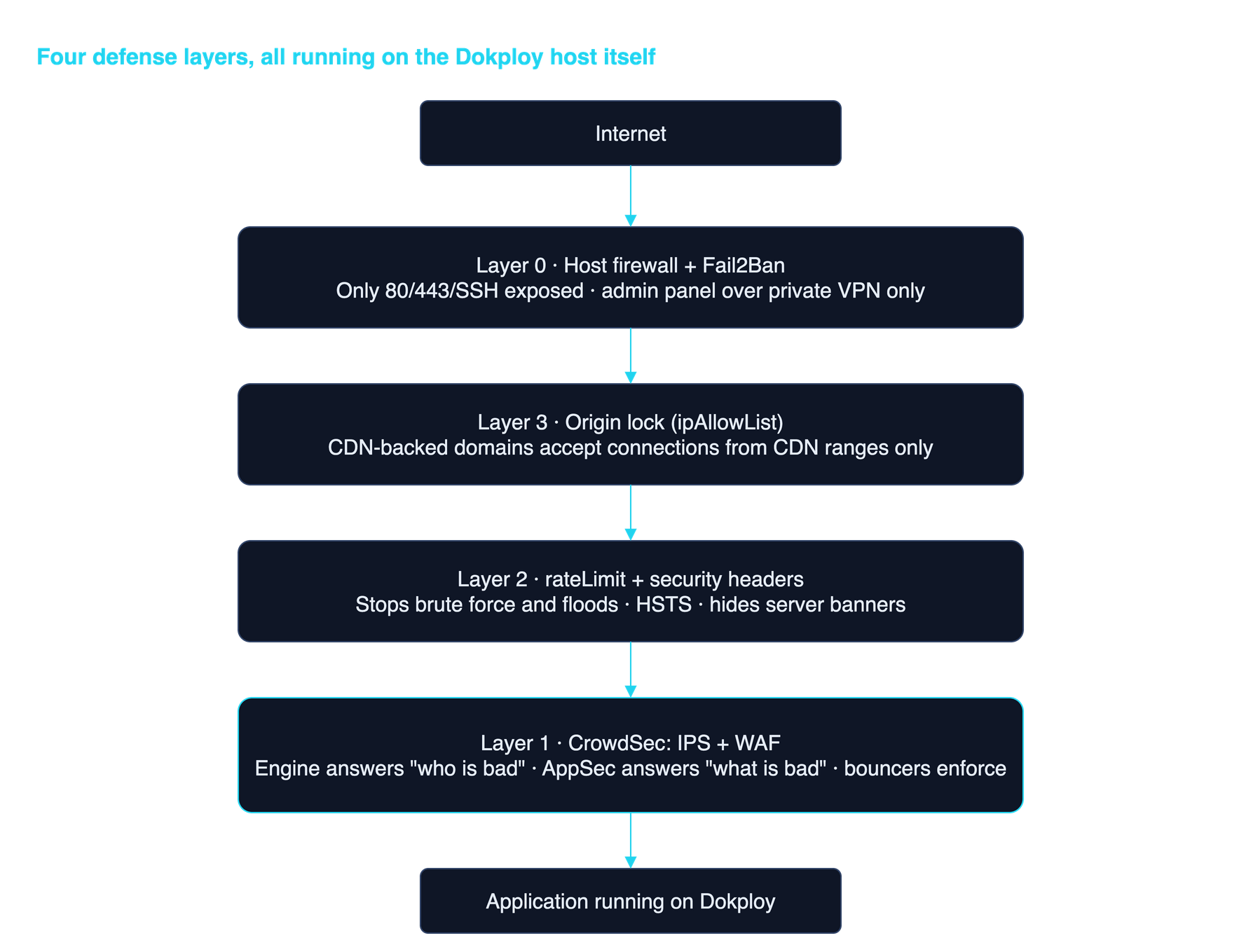
Layer 1 — CrowdSec: the brain of the defense
There are a few ways to get a WAF in front of Traefik: the OWASP Core Rule Set (CRS) via ModSecurity or the Coraza engine (ModSecurity's modern pure-Go successor), or CrowdSec, which bundles WAF and IPS together and adds a community IP reputation network that a static rule set cannot offer.
CrowdSec is an open-source behavioral detection engine (a modern replacement for Fail2Ban). It has four parts with clear responsibilities:
- Engine — answers "is this IP behaving badly?" by reading access logs plus community IP reputation. This is where decisions are made.
- AppSec (WAF) — answers "is this request an attack?" by inspecting the payload: SQLi, XSS, RCE, CVE virtual patching. Blocks at the HTTP layer, before the app is touched.
- firewall-bouncer — enforces blocks at the network layer (
iptables/nftables). - Traefik plugin bouncer — enforces at the HTTP layer, returning 403.
The subtle point worth remembering:
The engine answers "WHO is bad" (IP reputation, behavior). AppSec answers "WHAT is bad" (attack payloads). Two different questions, two complementary layers. Miss one and you have a blind spot.
The engine runs as a container and reads Traefik's access log:
# acquis.yaml — teach CrowdSec to read Traefik logs
filenames:
  - /var/log/traefik/access.log
labels:
  type: traefik
---
# enable AppSec as its own acquisition source (listening on :7422)
appsec_config: crowdsecurity/appsec-default
labels:
  type: appsec
listen_addr: 0.0.0.0:7422
source: appsec
Install the collections you need, especially virtual patching:
cscli collections install crowdsecurity/traefik
cscli collections install crowdsecurity/appsec-virtual-patching
cscli collections install crowdsecurity/appsec-generic-rules
virtual-patching earns its keep: it virtually patches fresh CVEs (exposed .git/config, Laravel debug mode, Symfony profiler…) right at the proxy, before the real application patch ships.
The bouncer plugin attaches to Traefik as middleware, with both modes on, block bad IPs and forward requests to AppSec for payload inspection:
# dynamic middleware
http:
  middlewares:
    crowdsec:
      plugin:
        crowdsec:
          enabled: true
          crowdsecMode: live
          crowdsecLapiHost: crowdsec:8080
          crowdsecLapiKey: "${CROWDSEC_LAPI_KEY}"
          # enable the WAF: forward requests to AppSec
          crowdsecAppsecEnabled: true
          crowdsecAppsecHost: crowdsec:7422
Layer 2, rate limiting and security headers: cheap, do it first
Before you even stand up CrowdSec, some things can be fixed with a single dynamic config file. Remember the basic-auth endpoint that returns 401 forever? Traefik has the medicine built in:
http:
  middlewares:
    ratelimit:
      rateLimit:
        average: 100
        burst: 50
        period: 1m
    inflight:
      inFlightReq:
        amount: 50
    security-headers:
      headers:
        stsSeconds: 31536000
        stsIncludeSubdomains: true
        stsPreload: true
        contentTypeNosniff: true
        customResponseHeaders:
          Server: ""          # don't advertise "I am Traefik"
Apply it globally to every router via entryPoints.websecure.http.middlewares. Cheap, effective immediately. If you only do one thing today, do this one.
Layer 3, origin lock: close the CDN bypass
For domains genuinely behind a CDN, lock the origin so it only accepts connections from the CDN's IP ranges. Anyone hitting the origin IP directly gets refused by Traefik before touching anything:
http:
  middlewares:
    cdn-only:
      ipAllowList:
        sourceRange:
          # your CDN's IP ranges — Cloudflare shown as an example
          - 173.245.48.0/20
          - 103.21.244.0/22
          - 104.16.0.0/13
          # ... get the full list from the provider's official source
          # and SYNC IT AUTOMATICALLY: hard-coding it and forgetting
          # to update means eventually blocking your own users.
One important note: ipAllowList checks the real TCP connection IP by default and does not read X-Forwarded-For, which is exactly the behavior you want here, because this is the layer that verifies "did this packet really come from the CDN?". Don't add an ipStrategy that reads headers on this middleware, or you open the door to header spoofing.
This is tightening the origin on your own machine, not "letting the CDN protect you". The CDN's IP list is just an allowlist, the decision stays with your Traefik.
Layer 0, the foundation: network, panel, SSH
Last but not least, and straight from Dokploy's official security recommendations:
- Expose only 80/443/SSH to the internet, and verify it by scanning from outside.
- Bind the Dokploy admin panel to a private VPN (Tailscale/WireGuard) only. Never expose the admin UI publicly.
- SSH with keys only, password login disabled, Fail2Ban enabled.
Boring items, and where most real incidents actually happen.
Two traps from real deployments
The solution above only works if you avoid these two traps.
Trap 1: Dokploy manages the Traefik config
Dokploy regenerates the Traefik configuration. If you hand-edit the static config file (traefik.yml), your changes may be overwritten on upgrade or when you change an application through the panel. The survival rule:
Prefer dynamic configuration (files in thedynamic/directory, or container labels), the kind Dokploy respects and preserves. Only touch static config when you must (for example declaring plugins underexperimental.plugins), and re-check it after every Dokploy upgrade.
The rateLimit, headers and ipAllowList middlewares plus the firewall-bouncer are all dynamic config, safe. Only the bouncer plugin needs a static declaration, and that is where to be most careful.
Trap 2: the real client IP, or how to ban the entire world
This is the trap that gets people shooting themselves in the foot. CrowdSec and rate limiting make decisions based on the client IP. But behind a reverse proxy (and behind a CDN), the "client IP" Traefik sees may be the CDN's IP, not the attacker's.
Get it wrong and here is what happens: brute force arrives from everywhere, but Traefik only sees one CDN IP range → CrowdSec bans that range → you have blocked the CDN, which means blocking all of your real users.
Doing it right means separating two groups of domains:
- Behind the CDN: set
forwardedHeaders.trustedIPsto the CDN ranges, then read the real IP fromCF-Connecting-IP/X-Forwarded-For. - DNS-only: the client IP is the direct connection IP, and you must not trust
X-Forwarded-For(it can be spoofed).
Getting the client-IP strategy wrong doesn't just make the defense useless, it turns it into a self-destruct button that blocks your own users. Sort this out before enabling any IP-banning mechanism.
Verification: don't trust, measure
An unverified security change is just hope. The minimum acceptance checklist:
- Network surface: scan from an external machine — only 80/443/SSH open, everything else times out.
- Origin lock:
curlthe origin IP directly with a CDN-backedHost:header → must return 403, not real content. - Rate limiting: fire past the threshold → must see 429, not 401 forever.
- WAF: send a classic SQLi/XSS payload to a test route → AppSec blocks it and it shows up in
cscli alerts list. - IPS: simulate a scan → the IP gets banned,
cscli decisions listhas the record, and the next request from that IP is dropped. - No self-inflicted wounds: real users through the CDN still get through;
cscli decisions listdoes not contain CDN ranges.
And because the defense layer itself can die, put it under monitoring: alert when a bouncer loses its connection, or when the ban count spikes — a sign that an attack is underway.
When you outgrow a single host
Everything above is written for one Dokploy cluster. Once your organization runs dozens of internal services across multiple clusters, with several teams shipping applications, the problem changes shape: it's no longer "install CrowdSec on the box" but who is accountable at 2am, who re-checks the configuration after every upgrade, and what evidence you can show an auditor that the defense layer is genuinely running.
In Vietnam, that evidence is no longer optional. Once your system falls under information-security level classification, an unguarded ingress is a documentation gap on its own. And if your internet-facing application is a primary business channel, consolidating WAF, DDoS protection, bot mitigation and API security into one coherent layer is exactly the WAAP problem.
What to take away
Dokploy makes self-hosting easy to the point of being dangerous: easy enough that you forget "it runs" and "it's safe" are two different things. Four things to remember:
- A reverse proxy is not a firewall. Traefik handles TLS and routing; it does not inspect attacks. The WAF/IPS layer is something you add on purpose.
- Verify, don't assume. From "does Docker bypass the firewall?" to "is my origin leaking?", every claim can be tested with one command. Security based on feel is security that doesn't exist yet.
- Defend at the origin. CDNs help but can be bypassed. The layer running on your host, seeing the packets that actually reach the app, is the one left standing, and it belongs to you.
- Layers, not silver bullets. Firewall + rate limit + IPS + WAF + origin lock: each catches a different kind of blow. The attacker has to get through all of them; you only need one to hold.
If you're running Dokploy (or any self-hosted PaaS with its own reverse proxy) on the public internet, spend fifteen minutes: list every domain, scan your ports from outside, and try attacking yourself. There's a good chance you'll find a door standing open.
Frequently asked questions
Does Dokploy come with a WAF or application firewall?
No. Dokploy uses Traefik as a reverse proxy for TLS and routing, but ships no WAF, IDS/IPS or rate limiting by default. You have to add those layers yourself.
Is Traefik a WAF?
No. Traefik is a reverse proxy and load balancer, not a web application firewall. It does not inspect payloads to block SQL injection, XSS or RCE. For a WAF you need to add CrowdSec AppSec, Coraza/ModSecurity (OWASP CRS), or an equivalent service.
How is CrowdSec different from Fail2Ban?
Fail2Ban reads logs and bans IPs locally using regex rules, good for SSH. CrowdSec does that too but faster (written in Go), supports IPv6, has a community IP reputation network, and adds AppSec as a WAF. A common setup keeps Fail2Ban for SSH and uses CrowdSec for the HTTP layer.
Do I need Cloudflare to secure Dokploy this way?
No. The whole solution runs on the Dokploy server itself, independent of any CDN. A CDN (even a paid plan) is an optional extra layer, not a requirement, and as this article showed, relying on a CDN alone can still be bypassed.
Do these principles apply to Coolify, CapRover or Portainer?
Yes. Any self-hosted PaaS that stands up its own reverse proxy (Traefik or Nginx) on a public VPS shares the same three gaps: Docker bypassing the firewall, an ingress with no WAF, and the risk of leaking the origin IP. The same layered defense model applies.
Update, 29 July 2026: what changed once we actually deployed it
The article above was written right after the audit. Nine days later we rolled the whole thing out on our production Dokploy cluster. This section records where reality diverged from the plan, plus the traps that only surface when you do the work. We left the original text untouched rather than quietly editing it, because the gap between the blueprint and the building is the part worth reading.
Four things the original got wrong
1. The engine belongs on the host, not in a container. The original described the CrowdSec engine as a container. That does not survive contact with reality: the firewall-bouncer has to write iptables rules on the host itself, and the engine needs to read container logs through the Docker socket. We installed the engine as an apt package on the host; only the HTTP-layer bouncer lives inside Traefik as a plugin.
2. Read logs from Docker stdout, not from a file. The original taught CrowdSec to read /var/log/traefik/access.log. The problem: Traefik's dynamic configuration directory is watched by the *file provider* — drop a .log file in there and Traefik tries to parse your access log as configuration. The correct approach is to emit accessLog to stdout and have CrowdSec read it through Docker:
source: docker
container_name:
  - dokploy-traefik
labels:
  type: traefik
3. LAPI address: use `docker_gwbridge`, not a container name. The original wrote crowdsecLapiHost: crowdsec:8080. Now that the engine lives on the host and the plugin lives in a container, they talk over the bridge. The trap: if you bind LAPI to the gateway of an overlay network (Swarm), CrowdSec refuses to start — that gateway only exists inside a network namespace, never on the host. Bind to docker_gwbridge, typically 172.18.0.1:
# /etc/crowdsec/config.yaml
api:
  server:
    listen_uri: 172.18.0.1:8080
And do not bind 0.0.0.0 either — that port is probably not in your firewall's drop list, which means you just published your LAPI to the internet.
4. AppSec is not a general-purpose WAF — this is the easiest thing to get wrong. The original (like most write-ups) leaves the impression that enabling AppSec stops SQLi, XSS and traversal. We measured it, firing from an external host that was not whitelisted:
?file=../../../../etc/passwd— not blocked, returned 200.?id=1 UNION SELECT NULL,version()--— not blocked, returned 200.User-Agent: ${jndi:ldap://...}(Log4Shell) — caught.
The reason: crowdsecurity/generic-rules contains only a handful of narrow rules (FreeMarker SSTI, WordPress uploads directory, and so on), while appsec-virtual-patching is a set of per-CVE signatures. That is *virtual patching*, not a general rule set in the OWASP CRS sense. If you want broad SQLi/XSS coverage you need to add something else (Coraza with CRS), or accept that this layer specialises in known CVEs and bad behaviour rather than novel payloads.
One detail worth knowing: Log4Shell was caught *out of band*, so that request still returned 200 — but CrowdSec issued a ban decision immediately after, and the next request from that IP was dropped at the packet layer (a timeout, not a 403). So never judge a WAF by the status code of a single request.
Three traps that nearly (and in one case actually) caused an outage
Trap 1 — a bouncer that runs but protects nothing. On a Docker host, the crowdsec-firewall-bouncer package installs rules only in the `INPUT` chain by default. But traffic bound for containers never traverses INPUT; it goes through FORWARD and DOCKER-USER. The result: the service is active, the logs are clean, the dashboard is green — and nothing is protecting your applications. That failure mode is worse than not installing it at all, because it manufactures confidence. Uncomment the chains:
iptables_chains:
  - INPUT
  - FORWARD
  - DOCKER-USER
Verify with iptables -S | grep CROWDSEC: the chain must be invoked from all three.
Trap 2 — editing YAML by string replacement took the ingress down. We inserted a middleware list into entryPoints.websecure with a text substitution. That block already contained http.tls, so the edit produced a duplicate `http` key. Traefik rejected the configuration and went into a crash loop — every site down until we restored the backup. Lesson: parse YAML, mutate the object, serialise it back. Never patch it as text. And always back up the static file first, because a mistake there is not "one site is broken", it is "everything is down".
Trap 3 — banning ourselves, then banning our own infrastructure. Twice in one afternoon:
- While verifying the rollout we
curled nine domains in a tight loop. CrowdSec saw exactly the signature of a crawling bot and banned the administrator's own IP. The symptom was confusing: domains behind the CDN kept returning 200 (those requests arrive from CDN IPs), while the DNS-only domains went dark. - Our Log4Shell test was fired from our own edge server — which the Dokploy cluster promptly banned, severing the proxy path between two of our machines.
So the whitelist must include the public IPs of your own fleet, not just private ranges, and it has to be in place before you enable any bouncer:
whitelist:
  reason: "internal infrastructure"
  cidr:
    - 100.64.0.0/10      # internal VPN
    - 10.0.0.0/8
    - 172.16.0.0/12
    - 14.x.x.x/32        # public IP of the edge
    - 36.x.x.x/32        # public IP of the standby edge
We dropped origin-lock — and why
The original proposed ipAllowList restricted to CDN ranges (Layer 3). In practice we closed that task without doing it, because of the actual DNS situation: five domains proxied through the CDN, five others DNS-only on the same machine. The origin IP is therefore already public. Locking ipAllowList would merely force an attacker to go through the CDN for those five hostnames, while he walks straight into the other five on the same Traefik. The effort buys no reduction in real risk, and it adds a way to shoot yourself: attach it at the wrong scope (entrypoint instead of per-router) and you kill your metrics ingest and your status page.
Origin-lock is only worth doing when every hostname on that machine sits behind the CDN. Half measures buy nothing. This is a textbook case of a control that is correct on paper yet meaningless in context; keeping it merely to complete the set would be self-deception.
Fail2Ban is gone too
The original said we would keep Fail2Ban for SSH. After measuring, we removed it: on a machine running both, Fail2Ban had zero bans in total since installation, while CrowdSec already ships an sshd rule set reading the very same log. Two systems writing firewall rules only produce duplicate bans and harder forensics. One system, one decision source, many enforcement points — that is the clean model.
Verified immediately after removal, on a machine under a live SSH password-guessing campaign: CrowdSec caught and banned ssh-bf, ssh-slow-bf, http-backdoors-attempts and http-bad-user-agent.
Monitor the defence layer itself
The closing section of the original suggested monitoring the defence. We built it properly, and these are the four alerts that earned their place — each one born from a silent failure we actually hit:
- Engine stopped reporting. Measured by the *age of the last sample*, not by
== 0: when the engine dies there is no series left to equal zero. - Bouncer stopped fetching decisions. Bouncers expose no metrics of their own, so their sign of life is polling the LAPI on schedule. We found an edge machine whose bouncer had been dead for days without anyone noticing — the cause turned out to be an unregistered API key, the service logging
bouncer stream haltedand exiting. - Ban rate spike — counting only decisions the machine itself produced. Include the community blocklist (about thirty thousand entries, synced in batches) and the alert cries wolf on every refresh.
- Parser health. Upgrading a web server changes log formats all the time; when that happens the engine still runs, the dashboard stays green, and it simply no longer understands the logs. Alert when the unparsed-line ratio passes 50%.
Three of those four alerts did not exist in the original plan. They appeared only after the real system failed in exactly those ways.
What we took away
The plan was right about the architecture and wrong about nearly every implementation detail — and those details are precisely the line between "protected" and "believing you are protected". A bouncer missing the DOCKER-USER chain still shows green. A fully enabled AppSec still lets SQLi through. An unmonitored defence layer can stay dead for weeks in silence.
If you remember one sentence from this update: attack yourself from an outside machine to verify the defence works, then check whether it is blocking you by mistake. Measure both directions — both happened to us in the same afternoon.
Related articles

What Dokploy is: a self-hosted deployment platform for small teams
Dokploy gives you a Heroku-style deployment workflow on your own server. What it does, what sits inside it, who it suits, and the three things newcomers trip over in production.
Read ↗
Vietnam's 2025 Cybersecurity Law: 5-level system classification and what to do
From 1 July 2026, Cybersecurity Law 116/2025 merges two prior laws, codifies "data security" and classifies systems into 5 levels. The new obligations and what to do.
Read ↗
Hansoll hit by ransomware: how manufacturing and FDI firms defend
The ransomware case targeting Hansoll Textile shows manufacturing and FDI firms are also targets. Practical defense lessons for manufacturers.
Read ↗Run your organization's defenses yourself
Orca WAAP: a self-hosted web app and API firewall with DDoS and bot protection.